Anyone can copy Your contents by visiting your blog and paste it in their blog.so these steps you can use for protection of copying your contents by the other sites while publishing your posts.
As far as the old saying,“Prevention is better than cure”,so try to follow these steps,this will not fully solve this problem,but we can somewhat prevent this problem.
Step 1:
Include a very clear copyright notice on your blog.
In the copyright notice mention what are all the things you will Allow and what are all those things you are not going to allow.
for further reference i will add the link of the wordpress at the end of this section.
Step 2:
Configure your RSS feed so that it displays post summaries.
for further you can change this setting to stop RSS feedings to the illegal scrapers.
For further details about this steps i will add the link of the wordpress help contents.
Step 3:
For finding whether your content is copied or not you can use Copyscape which will show the first 10 sites which equally or somewhat matching your post contents.plagiarism(piracy) is the common term used for content theft /copying.The copyscape site is,
http://www.copyscape.com/
Note:
If you found any of the sites copied your contents through copyscape,dont Click it through the copyscape hits,because those copied sites will block the copyscape search of your recently searched URL and when you tried to search the content of the post next time in Copyscape,it will show like this,
0(Zero) results found for your ( post name).
Thanks for reading, if u like my post kindly like it and share it with your friends.
Ashray Agrawal
So its better not to click those hits if you are using copyscape.
Its better you can check in Google by searching the title of your blog.Google will show the hits and based on that you can see the sites which is probably copied your contents.
There are so many free websites for checking content plagiarism,some of them are,
http://www.plagiarismchecker.com/url/
You have to mention the URL of your post to check for the copied contents in other sites.
I have just mentioned three steps above,there are another five steps are there and you can refer those steps in the following wordpress link,
http://support.wordpress.com/prevent-content-theft/
I hope this post will help you in some way or the other about whats going on in the blog content thefts .I will came up with different post next time.Thanks for reading this post. Feel free to Drop your comments about this post in comments section.
Tuesday, June 21, 2011


Monday, June 20, 2011
Best Mid range DSLR camera
| Canon EOS 500D / Rebel T1i review | ||||
 | ||||
| The EOS 500D, or Rebel T1i as it’s known in North America, is Canon’s step-up from the budget 1000D / XS. It inherits a number of aspects from the semi-pro EOS 50D including the same 15 Megapixel resolution, 3in VGA screen and HDMI port, while additionally boasting HD movie recording. While there are technical differences between their sensors, both bodies shared essentially the same resolving power in our tests along with similar noise levels. This all makes the 500D / T1i a powerful DSLR for the money and a great choice if you’re after a step-up from an entry-level model. Be sure to compare with the Nikon D5000 and the higher-end EOS 550D / T2i. Pros: High resolution; HD movies; VGA screen. Cons: 1080 movie mode is not as smooth as the 720p option. Overall: A powerful step-up from entry-level DSLRs. | ||||


| Sony Alpha SLT-A33 review | ||||
 | ||||
| Sony's Alpha SLT-A33 looks like a DSLR – and takes normal Alpha lenses – but is in fact a new type of camera employing a fixed translucent mirror; hence the acronym SLT for Single Lens Translucent rather than Single Lens Reflex. The translucent mirror allows most of the light to pass through to the sensor for full-time live view composition on the screen and electronic viewfinder, but reflects the remainder to the phase change AF system, allowing quick and continuous autofocusing in Live View and movie modes. In terms of 'normal' specs, the SLT-A33 has 14 Megapixels, 1080i video, 7fps continuous shooting and an articulated screen. A truly unique camera which delivers the ultimate Live View and 'DSLR' movie experience. Pros: Quick AF in Live View and movies; articulated screen. Cons: DSLR traditionalists will miss the optical viewfinder. Overall: A unique camera with the best movie AF here. | ||||


| Canon EOS 550D / Rebel T2i review | ||||
 | ||||
| The EOS 550D, or Rebel T2i as it's known in North America, slots between the 500D / T1i and Canon's semi-pro range. It actually inherits a number of features from the high-end EOS 7D, including the same 18 Megapixel resolution, same metering system and same movie modes, giving it the choice of 720 or 1080p at a variety of smooth frame rates, not to mention an external microphone input. The 3in screen is Canon's best yet with a wider 3:2 aspect ratio to match the shape of images. The viewfinder, AF, build and general handling are essentially unchanged from the 500D / T1i, but if high resolution and movies are your priority, it's a great choice. Pros: 18 Mpixels; HD video with mic input; great screen. Cons: Build quality, speed and AF same as cheaper 500D / T1i. Overall: The best choice for high res images and movies on a budget. | ||||


| Canon EOS 600D / Rebel T3i review | ||||
 | ||||
| Canon's EOS 600D / Rebel T3i is the company's latest upper entry-level DSLR, which at first glance appears to be little more than the EOS 550D / T2i equipped with a flip-out screen and wireless flash control. Both cameras are roughly the same size and share the same 18 Megapixel sensor, core HD movie modes, viewfinder, 9-point AF system, 3.7fps continuous shooting, 3in 1040k screen and 63-zone metering system. There's also a great deal of overlap with the higher-end EOS 60D, such as the articulated screen, but Canon's also included scene detection in Auto along with useful Digital Zoom and Video Snapshot movie options. As such it becomes Canon's most confident and powerful video-equipped DSLR, while also delivering great still photo quality. If you're into movies and don't need fast continuous shooting, it's an ideal choice, but compare closely with the Nikon D5100. Pros: 18 Mpixels; HD video with mic input; flip-out screen. Cons: Build quality, speed and AF same as cheaper 500D / T1i. Overall: Great image quality and the best Canon DSLR for movies. | ||||


| Nikon D5100 review | ||||
 | ||||
| The D5100 is Nikon's upper entry-level DSLR, replacing the popular D5000 and offering a step-up in features and quality over the budget D3100. The D5100 inherits the excellent 16 Megapixel sensor of the D7000, upgrades the size, resolution and hinge mounting of its screen, borrows the core movie capabilities of the D3100 and D7000 including continuous AF, while also offering an external microphone input and broader selection of frame rates at 1080p, and additionally features a new EFFECTS mode which applies a choice of fun filters, some of which also work on movies. The much preferable side-hinging for the screen has also eliminated the earlier D5000's disproportionately tall viewfinder head, allowing Nikon to design a shorter and curvier body for the new model. A great all-rounder but compare closely with the Canon EOS 600D / T3i.Pros: Great quality; HD video with mic input; flip-out screen. Cons: Cont AF in video can be distracting; slow UI for experts. Overall: Great all-rounder and arguably best Nikon DSR for video. | ||||


| Nikon D90 review | ||||
 | ||||
| Nikon’s D90 may be getting-on a little compared to the latest models, but remains a highly compelling choice for anyone looking for a good step-up from a budget DSLR. You get a 12.3 Megapixel sensor with excellent low-light performance, fairly swift 4.5fps continuous shooting, a maximum sensitivity of 6400 ISO, a large and bright pentaprism viewfinder, good build quality and a 3in VGA screen. As a feature-packed camera on first release, the D90 also sports Live View, and 720p HD video recording - indeed it was the first DSLR to record video. Completing the package is a decent 18-105mm kit lens with Vibration Reduction. A great package, but compare closely with Canon's EOS 550D / T2i, especially if you're into video. Pros: Great ergonomics, VGA screen, 720p movies, 4.5fps. Cons: Movie mode is manual focus and has video artefacts. Overall: A feature-packed DSLR that remains a great buy today. | ||||


| Canon EOS 60D review | ||||
 | ||||
| Canon's EOS 60D may numerically be the successor to the EOS 50D, but Canon's repositioned it as a mid-range DSLR; think of it as a step-up from the EOS 550D / T2i and it makes perfect sense. It shares the same 18 Megapixel resolution and HD movie modes as that model, but features a larger, brighter penta-prism viewfinder, faster continuous shooting, a fully articulated screen, a more sensitive AF system, wireless flash control, an upper information screen, virtual horizon indicator, and much more. The body materials may be the same, but the EOS 60D feels better in your hands and much more like a semi-pro body, even without the ultimate toughness of magnesium alloy. An ideal step-up model without the cost, weight and complexity of a semi-pro DSLR. Pros: Articulated screen; 5.3fps shooting; Full HD movies. Cons: No continuous AF during movies; out-featured by D7000. Overall: An ideal step-up model, especially for movies. | ||||


| Nikon D7000 review | ||||
Thanks for reading. Ashray Agrawal.  | ||||
| Nikon's D7000 is the successor to the best-selling D90 and applies the same strategy of packing high-end features into a mid-range body. The resolution has been increased to 16.2 Megapixels, while the movie mode now captures Full HD 1080p at 24fps with support for autofocus while filming. Continuous shooting has accelerated to 6fps and the viewfinder coverage increased to 100%. There's a new 39-point AF system, while the metering now employs a 2016 pixel RGB sensor. Nikon's also toughened-up the D7000 by using magnesium alloy on the upper and rear plates, whereas most mid-range DSLRs are all plastic, and there are now dual SD memory card slots. It's an impressive spec which outclasses the rival EOS 60D, but you'll be paying more for it. Pros: Tough; 6fps; 100% viewfinder; Full HD; dual SD slots. Cons: Screen doesn't flip-out; movie AF indiscreet; pricey. Overall: Semi-pro features for an upper mid-range price. | ||||


How to use shutter speed in photography
Learning how to use shutter speed effectively can create lively pictures and give motion to your subject without blurring your picture. Let’s define what it is and how it is measured, followed by some real world examples.
Shutter speed refers to the length of time your camera’s shutter remains open to allow light to enter and hit the camera’s image sensor. The shutter is a component in your camera body that will open when the shutter release button is depress. It will then close automatically after the duration you set for your shutter to be opened had elapsed. If you set it in bulb mode, the shutter will remain open for as long as the shutter release button remain depress until you release it.
Shutter speed is typically displayed on your camera in whole numbers. Example, if your camera displays 500, it actually means that the shutter will be opened for 1/500th of a second. Your camera might also display the shutter speed in quotation marks which represents seconds. Example, if your camera displays 5″, it actually means that the shutter will be opened for 5 seconds. Another mode of display is the bulb mode. When displayed as “bulb”, it means that the shutter will remain open until the shutter release button is released. You can control your shutter using the shutter priority mode. Faster shutter speed (e.g. 1/4000th of a second) will require more light for proper exposure. You can widen the aperture or bump up your ISO to compensate. The exact opposite applies when you are using slower shutter speed (e.g. 1/10th of a second).
- You wish to capture a moving subject and freeze it in action. Example, you might be at a F1 Grand Prix circuit and wish to capture the fast F1 cars. However, as the F1 cars are moving at speeds of up to 350km/h, you would want to use the fastest shutter speed possible to freeze the F1 car in action, so that the picture captured is not blurred due to subject motion.
- You are in a low light area and wish to take a shot of the scene but found that your pictures are blur due to hand motion. You can increase your shutter speed to overcome this problem and bump up your ISO or widen your aperture to compensate.
- Based on the previous example on F1 car, we can turn the situation around and use a slow shutter speed instead, to show how fast the F1 car is moving in the picture. You set your camera’s shutter to open for about 1/30th of a second or slower. You wait for your favorite F1 car to come along the track. When you see it coming, prepare and aim your camera at the F1 car. When it is close enough, depress your shutter release button and at the same time, pan along with the F1 car as it comes racing towards and away from you. The key here is to pan along with your moving subject, always maintaining your focus on your subject while panning along with it. This will capture the motion of the F1 car, where the foreground and background is blurred, but subject remains clear and in focus.
- From the previous example on low light area, you can also turn the situation around using a slower shutter speed instead. Bring along your tripod and mount your camera aiming at the low light area you wish to capture. Set your shutter to open for about 1/10th of a second or slower and narrow your aperture down to about f/11 or smaller for longer exposure, keeping your ISO as low as possible. Depress your shutter release button and wait for your camera to complete the shot. What you get is a very sharp picture which is properly exposed with no motion blur.

- You wish to capture the motion of flowing waterfall or river. Using fast shutter speed will freeze the water and make it look too static and not lively. Instead, you can apply the same concept of setting a slow shutter speed and small aperture, using your tripod for stability. This will allow you to capture the motion of flowing waterfall or river, giving a lively feel to your picture.
Based on the tips and examples above, you will have a good idea of how to use shutter speed effectively to prevent motion blur or create motion in your subjects and bring them to life.
Like and share this if you appreciate my work.
© Copyright – Ashray Agrawal. All Rights Reserved.
Nikon D90: An Overview
 |
 |  |  |  |  |
| Basic Specifications | |
|---|---|
| Resolution: | 12.30 Megapixels |
| Kit Lens: | 5.80x zoom 18-105mm (27-158mm eq.) |
| Viewfinder: | Optical / LCD |
| LCD Size: | 3.0 inch |
| ISO: | 100-6400 |
| Shutter: | 30-1/4000 |
| Max Aperture: | 3.5 |
| Dimensions: | 5.2 x 4.1 x 3.0 in. (132 x 103 x 77 mm) |
| Weight: | 25.2 oz (713 g) includes batteries |
| MSRP: | $995-1100, gadgetguru.com price=58,000rs priceinIndia.com is 45,000rs Indiaprice.com=65,000rs |
| Availability: | yes |
Nikon has been cranking out new digital SLR camera upgrades like crazy these last two years, with the low, high, and pro end of the lineup getting update after update, but the mid-level SLR in particular has gone more than 18 months without an upgrade. While the Nikon D80 has a rich feature-set and maintained a high resale value throughout its tenure, it's due for an upgrade.
Though it's late to the party, the Nikon D90 arrives fashionably, just as its predecessor did in late 2006. It comes sauntering in with most of the current hot features that the D80 lacked, plus a new twist that will bowl them all over with its relevance and utility.
With a 12.3-megapixel sensor, the Nikon D90 rises to the resolution of the more professional D300. It also shares the same sensitivity as the D300, ranging from ISO 200 to 3,200, plus L1 (100) and H1 (6,400).
Another essential upgrade on the Nikon D90 is the move to a high resolution 3-inch LCD screen. The 920,000-pixel display has a 170-degree viewing angle and appears to be as nice as the new screens found on the D3 and D300. It makes checking focus and using Live view mode that much more pleasant.
New to the intermediate range for Nikon, the Live View feature offers some new tricks over the mode found on the Nikon D90's high-end predecessors, particularly including Face Detection. Surprisingly, there is no phase-detect autofocus available on the Nikon D90 when in Live view mode, only three contrast-detect modes: Face Priority, Wide Area, and Normal Area. Just as we've seen on consumer cameras, in Face Detection mode, a box surrounds detected faces and follows them around the screen. The Nikon D90 can track up to five faces. Live view is activated with a dedicated button just right of the LCD.
Though Face Detection is helpful in Live view mode, its utility goes further, as it's now an integral part of Nikon's Scene Recognition System (SRS). Thanks to the Nikon D90's 420-pixel matrix metering sensor, the SRS can combine color metering with autofocus sensor data and tune white balance and exposure with a particular bias toward getting faces exposed properly. In theory, this should also include making sure the Nikon D90 focuses on an eye rather than a nose or forehead. If true in practice, this is quite an advance. Face detection even comes into play in i-TTL Flash control.
The Nikon D90's 11-point phase-detect AF system is arrayed in a diamond pattern and now includes 3D focus tracking as found on the D3 and D300.
Since the dawn of Live view on SLRs, the obvious question has been, "Why no movie mode? If you can draw a live image off the sensor, why can't you record it?" Nikon is the first to answer the question with a resounding, "You can!" The Nikon D90 records movies as a Motion JPEG in AVI format at 24 frames per second at what they're calling "720p equivalent" resolution: 1,280 x 720. Other resolutions include 640 x 424, and 320 x 216. Though you have to focus manually, and aperture remains fixed during recording, audio for the videos is captured through the monaural mic on the camera.
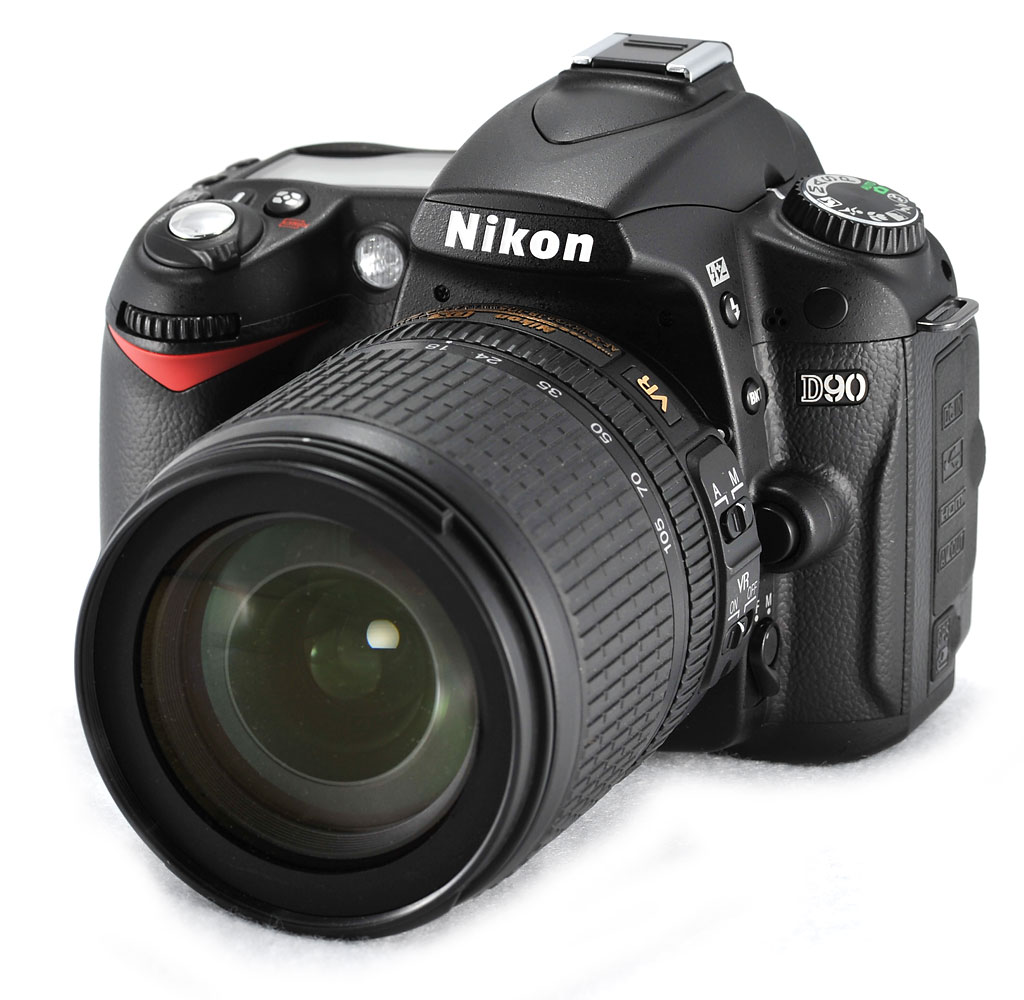 A new lens will ship with the Nikon D90 kit, as well: the Nikkor 18-105mm f/3.5-5.6 ED VR, with one extra-low dispersion element and one hybrid aspheric element to improve image quality.
The Nikon D90 began shipping to the US market in September, 2008, with a suggested retail price of $999.95, or $1,299.95 with the 18-105mm f/3.5-5.6 ED VR lens. (Note that you save about $100 buying the lens with the kit.)
Nikon D90 User Report
by Ashray Agrawal
There are a lot of great digital SLRs on the market, and I've had the pleasure of using most of them. But I've never taken to a camera as quickly and easily as I did to the Nikon D80, announced in 2006. Within moments of using it, I could tell I had a winner in my hands. The fit, the operation, and the lens was just right for getting all the shots I saw around me, in one camera.
The Nikon D90 felt so much like the Nikon D80 that I had to check the badge to make sure I hadn't picked up the wrong camera. Even the new lens felt pretty much the same, if a little shorter. The dimensions of the Nikon D90's body are indeed identical, measuring 5.2 x 4.1 x 3.0in (132 x 103 x 77mm), and the weight is only 1.2 ounces (35g) heavier. But what you get for that extra weight is noticeable indeed.

Look and feel. Though many elements are subtly restyled, the Nikon D90's front end has only one new feature: three holes for a microphone, just up and left of the D90 logo. This is, of course, for the new movie recording mode. All of the buttons are in the same locations and have essentially the same functions. Note also that the autofocus screw drive is still in place on the Nikon D90, meaning it will still drive old autofocus lenses as well as the new electronic lenses, something not included in the less-expensive Nikon D40, D40x, and D60.

On the back, again the Nikon D90's controls are restyled and the LCD is larger, but most of the controls are in familiar positions. Right of the LCD is where you'll find the major differences. First is the Live view button, marked with the letters Lv. Just below that is the new navigation cluster, which, like the Nikon D700, has an OK button in the center. The arrow pad is locked by the switch just beneath it, and the Info button, again from the D700, takes up position where the OK button was on the Nikon D80. The Info button brings up a status display, and a second press brings up a new onscreen menu.

The top deck has nothing new, just a slight reshaping to the buttons and a new top status LCD layout. The significant upgrade here is the new 18-105mm lens. While it doesn't have the extra reach of the 18-135mm lens that came with the D80 bundle, it does have the benefit of Vibration Reduction, Nikon's optical image stabilization.
Holding and shooting. The Nikon D90 feels just about identical to the Nikon D80. It's smaller and lighter than the D300, but still has a good grip, with a good dent inside the grip for the tips of your fingers. It also feels more substantial than the Nikon D60, with more of what an enthusiast photographer wants from his camera. I was very happy with the new multi-controller, which includes the OK button in the middle, rather than in some location distant from the menu navigation tool.
 As on the new Nikon D700, the Nikon D90 also has a new Info button for bringing up the new rear Status display, and further activating the submenu. The submenu includes different items, but they're well-tuned to the enthusiast photographer. Options include changing Long Exposure Noise Reduction, High ISO Noise Reduction, Active D-Lighting, Set Picture Control, Assign Func. Button, and Assign AE-Lock/AF-Lock button. Whether many photographers will use all of these functions, it's good to have them here, rather than having to dig for them in the menu.
Easy access. Most important functions that I usually want to access quickly have their own button, including Flash Exposure Compensation and Bracketing.
Changing most other items of importance is done by a button, including ISO, White Balance, Image Quality (on the left of the LCD); and metering mode, EV compensation, Drive mode, and Autofocus mode (on the top deck); and even flash exposure compensation is integrated into the flash pop-up button, appearing on the left of the lens mount, just above the Bracket button. These are all critical functions that need their own button for fast access, and they're out where you can find them easily; in the case of the latter two, you'll have to learn their positions, since they're out of sight, but at least you won't have to dig in the menu to activate these features.
Having the power switch around the shutter button is always nice too, because you can turn the camera on without taking your eye away from the viewfinder. I frequently turn my digital SLR off as I walk around, and some models make you pull the camera from your face to even find the switch.

Continuous mode. 4.5 frames per second. (Click to view/download 395KB MPEG-4 file.)
Like all other Nikons, the shutter sound of the Nikon D90 is relatively quiet and tame. It's not whisper quiet, but there's not a lot of winding and whirring, just the necessary clicking to activate the mirror and shutter. Check the video at right to see what the Nikon D90 sounds like at its maximum frame rate of 4.5 frames per second.
According to company figures, the Nikon D90 speeds along in several areas over its predecessor, including startup time (0.15 compared to 0.18 on the D80), shutter lag (0.065 compared to 0.08), and optical viewfinder blackout time, which is down to 120 milliseconds from 150 milliseconds. That's of particular importance to me, because I like to keep my eye on the subject.
Optical viewfinder. Similar to the Nikon D80's viewfinder, the Nikon D90's 11-point autofocus system is arrayed in a diamond formation. Still called the Multi-Cam 1000, as on the D80, the Nikon D90's AF engine has been updated to include 3D focus tracking and the advantage of Face Detection, which will bias AF points to favor eyes over noses and other objects in a scene. As a test of this system, I held my hand up in front of my nose much like the Three Stooges used to do to protect their eyes from pokes by their fellow stooges, and had someone take a picture of me. The Multi-Cam 1000 consistently lit up the AF points right over my eyes, rather than choosing the closer object (my hand), which was a welcome surprise. If this system is applied to a camera with 51-point autofocus, it will realize its full power. Nikon D90 users will have to remember to keep their subject's eyes under the 11 AF points for it to work properly, but that's better than having to hope the camera will guess right. Better, of course, is to lock the AF point manually; but if you're in a hurry, you'll take what you can get.
LCD. Another significant treat for D80 upgraders, the LCD is the same bright, crisp, 920,000-pixel LCD screen found on the Nikon D300, D3, and D700. Three inches big, it makes checking your images more satisfying and sure; and autofocus in Live view mode is bound to be more accurate as well. The D80's screen was no slouch by any means, but higher resolution is higher resolution. Even menus benefit from the higher res, more color-rich screen. For one, they can use smaller fonts for more descriptive titles, and include more explanatory text via the help button.
A removable screen cover is still included with the Nikon D90, but the back glass is tempered to resist scratching. I've finally gotten used to using the screen protector, but be sure to carefully clean it before going out for a shoot in daylight, as the protector can transmit even more glare in daylight when it's dirty or smudged. The chief benefit of the screen cover is that if you scratch it, it's at most $20 to replace; the LCD glass, on the other hand, will cost a lot more.

Face detection. Just as we've seen on non-SLR digital cameras, the Nikon D90's Face detection helps determine focus, exposure, and white balance. (Click to view/download 1.7MB MPEG-4 file.)
Live view shooting. Activating Live view on other Nikon SLRs has included turning the Drive Mode dial to Lv and then pressing the shutter button to lock the mirror up; hardly intuitive. The Nikon D90, however, has a dedicated Live view button on the back, just right of the LCD, within easy reach of the thumb. With a single press of the Lv button, the mirror flips up and Live view framing begins. The difference with the Nikon D90 is that you can only focus in Contrast-detect mode, whereas the Nikon D300 and D700 allowed a choice between Handheld (Phase-detect) and Tripod mode (Contrast-detect mode). Phase-detect AF in a Live View SLR is always a noisy affair, as it generally involves dropping and raising the mirror twice (once to focus and once to take the shot), but it's generally faster than contrast-detect focusing, particularly as implemented on the D90. There's a good reason why Nikon refers to the contrast-detect AF mode as "Tripod mode," as it takes a long time for the camera to focus when using it; easily several seconds in some circumstances, and never less than about 2.3 seconds in our laboratory testing. Still, it works very well if you're not in a hurry, and by its very nature, is never subject to the front- or back-focusing that can plague phase-detect AF systems if they're even a tiny bit out of adjustment.
If face detection is activated, the Nikon D90 quickly begins tracking faces, placing a yellow box around each one, up to five at a time. Once focus is achieved, the box turns green. It's just as we've seen from almost all recent non-SLR digital cameras, but it's impressive on an SLR. Panasonic, for the record, was first with this feature.

Movie mode. Capturing a movie is as easy as pressing the OK button when in Live view mode. (Click to view/download 1.9MB MPEG-4 file.)
Nikon is first with something else: Movie recording in Live view mode. Just press the OK button to start recording. You have to set focus before you start shooting your movie, but you can still manual focus while you're shooting, as well as zoom. The movie will record the noise of the zoom ring to an extent, depending on which lens you're using and how fast you zoom, but it's still pretty impressive. A whole new generation, now of non-professionals, will learn what it means to "pull focus" as the moment of interest turns from one subject to another. It's a cinematic technique usually performed by someone other than the camera operator, who is too busy framing the image to attend to focus as well. But millions of Nikon D90 owners will be able to try a technique that few camcorder owners can.
Movie resolutions include 1280x720 (16:9), 640x424 (3:2), and 320x216 (3:2). Recording times are limited to five minutes per clip for HD mode, and 20 minutes per clip for the latter two modes. Nikon couldn't explain the reason for the limit as of this writing, but it's likely due to sensor heating issues that might start to degrade image quality. The frame rate is 24 frames per second, and audio is monaural, not stereo. Approximate maximum file sizes for two of the modes are 588MB for the 1,280x720-size movies, and up to 2GB for the 640x424 movies.
As a Nikon representative pointed out, it's particularly interesting that it's Nikon, a company that has never had a dedicated camcorder camera, that is first breaking down this barrier in the SLR world. It will be fun to watch what photographers will produce with a video recorder that can use a full range of quality Nikon glass.
Video Examples: Dave shot some examples of video with the D90, so you can see what the different resolution levels look like. Rather than take up a lot of screen space with a number of thumbnails here, check out our Nikon D90 Video page for a number of examples as well as Dave's observations about the D90's video recording.
 Viewing images. Playback mode's enhancements include a new calendar display, a 72-image thumbnail display, a 12, 9, and 4-thumb display; and a new enhancement to the Histogram view that locks the histograms to the displayed image as you zoom. In other words, the histograms show data for just the displayed portion of the image. The retouch menu has new features, including Cross screen and image overlay options, as well as the ability to rotate images in-camera, and create fisheye distortions. For more on this, see the Operation tab of this review.
Sensor. A step up from the D80's 10.2-megapixel sensor, the D90's 12.3-megapixel CMOS sensor may be the same as is found in the Nikon D300, but Nikon representatives were not sure as of this writing. Quoted dimensions are different, measuring 23.6 x 15.8mm, while our info on the D300 says it's 24x15mm. The Nikon D90's sensor has 12.9 megapixels total, but only 12.3 are effective. Output is 12-bit, so you won't get the same lovely 14-bit RAW images, nor the 14-bit Analog to Digital conversion that you get on the Nikon D300.
Sensor cleaning. Nikon's multi-frequency sensor cleaning is also employed in the D90, vibrating the optical low-pass filter glass perpendicular to the plane, rather than parallel as most sensor cleaning systems do. Due to the extreme variability in types of dust in the environment, don't expect any sensor cleaning system to remove everything, but it's certainly better than no cleaning system at all.
Scene Recognition System. Scene recognition is something that Nikon has been working on for years, and these last few models have seen incremental improvements to the system. With the Nikon D90 comes Face recognition.
Nikon's 3D Color Matrix Metering system employs a 420-pixel RGB light meter that covers most of the image area (the D300 and higher models use a 1,005-pixel RGB sensor). As in past models, the Color Matrix Metering system compares what it sees in the image to a database of 30,000 photos to make its metering decisions for each scene. They've added more to properly gauge factors like white balance and subject motion, and now they're tracking faces with SRS. The autofocus sensors are another piece of the SRS puzzle, each aspect informing and tuning the other. Finding and focusing on eyes rather than foreground objects, or even foreheads and noses, is one particular benefit of the overall integration. Another is improved 3D tracking of objects as they move across the image area. The RGB sensor may not be able to help focus on an object, but it can add a set of data for the Nikon D90 to use while tracking a subject with the autofocus system. For example, if a red object is traversing the frame from left to right, and growing in size as it does so, the SRS would add this information to the AF-sensor data to help it tune the focus more quickly.
Active D-Lighting. No longer new, Active D-Lighting keeps gaining enhancements. In addition to the Auto Active D-Lighting mode added with the Nikon D700, the Nikon D90 gains an Extra High setting to add even more punch to shadow detail. Note that JPEG files modified as they are captured with Active D-Lighting, so there's no unaltered "original" to refer back to: Consider whether you want top shoot RAW + JPEG to back up those files, or even use D-Lighting after capture if you think an image would benefit from the help.
 Picture Control. The Nikon D80's Optimize Image setting has been replaced with the Picture Control system found on other recent Nikon digital SLR cameras. Options include Standard, Neutral, Vivid, Monochrome, Portrait, and Landscape. Each Picture Control includes adjustments for Sharpening, Contrast, Brightness, Saturation, and Hue. Monochrome mode allows adjustment of Sharpening, Contrast, Brightness, Filter effects, and Toning. You can also apply Picture Control settings to movies, and Scene modes have complete control over adjusting which Picture Control setting they use, based on information from the Scene Recognition System.
Ports. Top to bottom are DC in, USB, HDMI, AV Out, and GPS/Remote control ports.
Outputs and inputs. New to the output stack is HDMI for easy connectivity to a high definition television, and an Audio/Video output connector (the D80 has a Video connector). Under a separate door you'll find the same Remote control port, but it's now dual-purpose, allowing connection of the new GP-1 GPS accessory, as well as the MC-DC1 Remote cord.

Battery grip.
Battery and storage. You can get up to 850 shots (CIPA standard) with an EN-EL3e battery; that doesn't include any Live view usage or video capture. You can enhance the Nikon D90's battery capacity with the Nikon MB-D80 Multi-power battery pack that was designed for the Nikon D80. If you have large hands or shoot in portrait mode a lot like I do, battery grips can really raise your comfort level. You can use two EN-EL3e batteries, or six AA batteries in the grip. Adding the battery grip does not increase frame rate, as it does on the Nikon D300 and D700, but it does add greater control if you don't mind the weight.
Image storage is via SD cards, which offer up to 32GB capacity at this point. Some are disappointed that Nikon switched to SD in this level of digital SLR camera, but other manufacturers have begun to follow suit, including Canon. On a practical basis, current SD cards provide plenty of storage (does anyone really need more than 32GB on a single card?), and modern SD cards are quite fast, if not quite up to the level of the latest UDMA CompactFlash cards. SD cards are also somewhat more robust, less prone to bent contact fingers in the camera or card reader jamming the card connector while also rendering the camera useless.
Bottom Line: D80 upgraders. Certainly, one large group of potential D90 buyers are current owners of the previous D80. Building on the strengths of its excellent predecessor, the Nikon D90 has an awful lot going for it.  It upgrades several specs and adds a number of new features over the D80. The key question is whether current D80 owners will find upgrading to the Nikon D90 a worthwhile move or not. To my mind, there are several factors that could drive this decision:
Higher Resolution - Maybe not so much. While the move from 6 to 10 megapixels in going from the D70 to the D80 was a significant and noticeable increase in resolution, the move from 10 to 12 is actually pretty minor. You'll see slightly more detail in the D90's shots, but not enough to justify upgrading. (IMHO, at least.)
High-ISO Performance - Some benefit, but again, perhaps not enough to justify an upgrade. Based on our tests, in-camera JPEGs from the D80 are actually a bit cleaner than those from the D90 at least at ISOs below 1,600. At ISO 3,200 and 6,400, though, the D90 does demonstrate noticeably better noise processing.
Video - Definitely! As we discuss elsewhere, the HD video produced by the Nikon D90 is far from perfect. If you really care about video, the best bet is still to get a camcorder. If you're like me though, you probably often find yourself bringing a pocket digicam along on a trip, just to have the ability to grab occasional "video snapshots." This is exactly what the D90's video mode lets you do, and having it could let you finally leave the digicam at home. (Dave says he'll probably upgrade his D80 for this very reason.)
Chromatic Aberration Correction - Definitely! To our minds, not enough has been made of this feature on the D90. Chromatic aberration is what causes the purple and green fringes you often see around the edges of high-contrast objects in the corners of the frame. CA is a particular issue in zoom lenses, particularly ones with long zoom ratios. Depending on the subject you're shooting, it may be more or less of a problem, as it's generally restricted to the corners and edges of the frame. I find it very distracting though, and have seen many otherwise good images ruined by it. The D90 corrects this to an amazing degree, turning lenses I'd otherwise consider marginal into excellent performers. To my mind, this alone could be reason enough for a D80 owner to upgrade to a D90 body. The kit lens for the D80 was Nikon's 18-135mm optic. This was a very sharp lens, but it also showed a lot of chromatic aberration in the corners. On the Nikon D90, this lens turns into a beautiful performer in nearly every respect. The D90's own 18-105mm optically stabilized kit lens also has only so-so CA performance on its own, but combined with the D90's distortion-reduction processing turns into a stellar performer.
Faster Shooting - Definitely! With a maximum continuous-mode frame rate of 4.5 frames/second, the Nikon D90 is 50% faster than the 3 frames/second of the D80.
Whether you decide to upgrade or not will obviously depend a lot on how and what you shoot and the state of your budget. If you don't care about Live View or movie recording, and aren't too bothered by chromatic aberration in your current lens collection, you can probably take a pass on this particular evolution of Nikon's prosumer DSLRs. On the other hand, if any of the above strike you as must-haves, the D90 is a bigger step forward than we're accustomed to seeing between generations of SLRs from a given manufacturer.
Bottom Line: Competitive Decisions For people buying their first DSLR, Canon is Nikon's arch-rival and their models will most likely be the ones most shoppers will be comparing the D90 to. With the D80, Nikon cleverly split Canon's price structure down the middle, offering more features at a higher price than more down-market Canon models (like the XTi), but keeping the total price well below that of Canon's next model up the line (the 40D). With the D90, they've followed the same strategy, although the upgraded features Canon has added to their new XSi does narrow the gap there somewhat, and (for a while at least), the fire-sale clearance pricing we've seen on their 40D brings it down to close to the same price as the D90. Here's a quick breakdown of how these cameras compare:
Compared to: Canon Rebel XSi - The Canon XSi is priced quite a bit below the D90, but in making the Canon/Nikon choice, many people will likely consider it, as it's the closest Canon model on the low side of the D90's price.  In this case, though, "closest" means a good $500 or so less expensive than the D90, comparing prices for the kits including lenses. Body-only, as this is being written in mid-October, 2008, the XSi is selling for about $350 less than the D90. (The D60 is the Nikon model closest in price to the XSi.) The XSi and D90 have essentially the same resolution and both have Live View features, but the similarities pretty much end there. Most obviously, the D90 has movie capability. The D90 also shoots faster in continuous mode (4.5 vs 3 frames/second), and goes dramatically higher in ISO (light sensitivity) rating, to a maximum of 6,400 vs 1,600 for the XSi. Then there's the automatic correction for chromatic aberration. Minor details include a significantly higher resolution LCD screen, viewfinder with LCD-based grid that can be turned on and off, extensive in-camera RAW file processing, and direct support for Nikon's wireless flash system. The D90's kit lens also has a significantly longer zoom range. In its favor, the Canon XSi offers a live histogram display in its Live View mode and has 14-bit RAW files and internal processing, which can provide smoother tonal transitions, particularly when processing images from RAW files with heavy exposure adjustment. It also comes with more capable RAW-processing software at no added cost. Any way you slice it though, the D90 delivers dramatically more capability, albeit at a considerably higher price.
 bringing the cost of the 40D down to that of the D90, or even a bit below. (As of this writing in mid-October, 2008, the 40D was available body-only online for as little as $900, almost a hundred dollars less than the D90.) Relative to the 40D, the Nikon D90 offers its HD movie recording capability, contrast-detect autofocus in Live View mode, a couple of extra megapixels, one stop higher maximum ISO, the snazzy viewfinder with on-demand gridlines, its extensive in-camera RAW file processing, the automatic CA correction, and the direct, in-camera support for Nikon's wireless lighting system. On its side of the ledger, though, the EOS-40D offers faster continuous-mode shooting, at 6-6.4 frames/second, depending on the shooting mode, vs 4.5 for the D90. The Canon 40D also has 14-bit internal processing, a PC-type sync terminal for connecting to external flash systems, and full-capability RAW processing software included in the box. The D90 still sports more features, but the 40D's higher continuous-mode shooting speed and 14-bit processing might sway some users in its favor. A closer contest than that with the XSi, but the scales still seem to tip toward the D90. If you find the Canon 40D a compelling bargain, though, our advice is to move fast, as the 40Ds remaining in the market are likely to sell through quickly.
Compared to: Canon EOS-50D - Here's where the D90 will feel its stiffest competition from the Canon lineup, but as was the case with the previous D80/40D matchup, at a considerably higher price.
 Here, the Canon 50D bests most of the D90's specifications, with 15 megapixels to the D90's 12, 6.3 frames/second to the D90's 4.5 and maximum ISO of 12,800 vs the D90's 6,400, and of course 14-bit image processing and no-added-cost full-capability RAW processing software. It also has shading (vignetting) correction which the D90 lacks. The only significant D90 features not found in the 50D are HD movie recording and chromatic aberration correction. The Canon 50D does have rather an odd choice for its kit lens, though, a 28-135mm image-stabilized model that equates to a 44.8-216mm equivalent range on a 35mm film camera. The wide end of that isn't very wide at all; we think most people would find his an awkward lens to work with: Most users are going to want something capable of going much wider. Leaving the lens out of the equation then, the body-only prices as of this writing in mid-October 2008 were running about $1,400 for the Canon 50D vs $990 for the D90.
All things considered, we once again see a Nikon prosumer SLR model placed squarely in between two Canon models, in terms of both price and capability. Even compared to the higher-end Canon product though, the D90's rich feature set does much to recommend it, making it a compelling proposition.
Nikon D90: In the Box
The Nikon D90 kit ships with the following items in the box:
- Nikon D90 body
- AF-S DX Zoom-Nikkor 18-105mm f/3.5-5.6 G ED VR Lens
- Body cap
- Front lens cap
- Camera strap
- Rubber eyecup
- USB cable
- Quick charger (MH-18a)
- AC power cord
- Li-ion battery (EN-EL3e)
- Accessory shoe cover
- Plastic LCD protector panel
- PictureProject CD ROM
- Quick start guide
- Instruction manual
- Warranty and registration card
Nikon D90: Recommended Accessories
- Large capacity SD/SDHC memory card. These days, a 2GB or 4GB card is inexpensive enough, and you'll want a large card if you plan on recording many HD movies. Good to buy a higher-speed card also, able to record fast enough to not limit movie duration simply due to card speed. (SanDisk Ultra/Extreme III, Kingston 133x or equivalent)
- Camera case for protection
- Accessory lenses
- Accessory flash: SB-400, SB-600, SB-800, SB-900 (SB-600 is most economical to do off-camera flash with Nikon's wireless lighting system.)
Nikon D90 Conclusion
| Pro: | Con: |
|---|---|
|
|
I'm starting to feel strange about saying Nikon's done it again, but it looks like they have. The Nikon D90 looks like a genuinely excellent camera for the intermediate photographer, and a great choice as a full-featured, light weight body for those who own a Nikon D200 or D300. The addition of video is ground-breaking, and will open up new possibilities that will be fun to explore, even though I wish it handled motion better than it does. Really, my only major disappointment for the intermediate market is the lack of a higher frame rate. I'd like to see at least five frames per second, if not six. But at least they raised it to 4.5 from the Nikon D80's three frames per second. Otherwise, there's little to complain about, and only more great features to praise.
As they did with the D80 before it, Nikon has cleverly positioned the D90 squarely within a gap in Canon's lineup: It's more expensive than the Canon XSi, but delivers many more features. At the same time, while it doesn't quite measure up to some specs of the Canon 50D (although coming close in many areas, surpassing it in some), it's also a good bit less expensive than that model. All in all, the Nikon D90 presents a truly compelling proposition for intermediate photographers - Or novices looking for a camera with plenty of capability to grow into. For Nikon shooters it offers a great step up from the previous D80 or previous entry-level Nikon DSLRs like the D50, D40, or D40x. For more advanced Nikon users, it makes a great second body for those whose main camera is one of Nikon's higher-end models, like the D200 or D300.
Bottom line, the Nikon D90 is an exceptionally well-rounded digital SLR offering, with just about everything an aspiring photographer will need, and quite a few of the advanced features found on the higher-priced SLRs in Nikon's line, but at a lower price. Very highly recommended, and an easy Ashray's pick.
For more photo reviews n sample see this http://www.flickr.com/cameras/nikon/d90/
Share it if you like it.
Thanks for reading.
Ashray
Subscribe to:
Posts (Atom)